Developing
- SQLite Setup - Using SQLite, the default database for self-hosted instances
- Postgres Setup - Setting up Postgres for local development
- Querying the Database - How to pull data from the DB in the app
- Supabase Setup - Configuring a self-hosted Supabase instance for Domain Locker
- Environmental Variables - Configuring the global environment
- Debugging Starter - Resolve issues in Domain Locker Self-Hosted
- Checking Logs - Start debugging an issue, or monitor the app with logs
- Components and Routes - Get started with new components, routes and services
- App Styling - Applying styles to app components
- API Endpoints - Running certain logic on the server-side
- Static Content - Adding documentation, articles or other static content
- Translations - Adding a language and internationalizationing component text
- Error Handler - Gracefully handle errors, log them, and show toasts to users
- Notifications for Self-Hosted - How to setup alerts for domain changes and upcoming expirations in a self-hosted Domain Locker instance
- Add Domain Logic - How the add domain logic works
- Animating In - Subtle on-scroll animations for cards and components
- Feature Flagging - Enabling or disabling specific features on a per-user or environment basis
- Lazy Loading - Defer loading components until they become visible in the viewport
- Third-Party Docs - Documentation for the technologies and services used
- Toast Messages - Showing pop-up toast notifications to users
Development Setup
App Setup
Development Environment
git clone git@github.com:Lissy93/domain-locker.git
cd domain-locker
npm install
cp .env.example .env
npm run dev
Build for Production
To build for production, use npm run build, then npm start.
Or to build for a particular platform, use the build:vercel, build:netlify commands.
Database Setup
While running in dev, you will be automatically connected to our public development Supabase instance, so there is no need to setup or configure a database. (Note that the dev database is frequently wiped).
Alternatively, you can deploy your own database, either SQLite, Postgres, or a (self-hosted or Pro) Supabase instance.
Option 1) SQLite
There's nothing to set up. With no Postgres or Supabase env vars set, the app creates a SQLite database at ./data/domain-locker.db on first use. See SQLite Setup.
Option 2) Postgres
Create a database and user, following the setup instructions in Postgres Setup.
You'll then just need to pass the following env vars to the app, so it can connect to your Postgres instance. The schema is applied automatically on first start.
DL_PG_HOST='localhost'
DL_PG_PORT='5432'
DL_PG_USER='postgres'
DL_PG_PASSWORD='supersecret'
DL_PG_NAME='domain_locker'
Option 3) Supabase
Deploy a new Supabase instance, apply the config from dl-sb-iac and set the following environmental variables:
SUPABASE_URL=xxx
SUPABASE_ANON_KEY=xxResolving Issues
If you run into issues, see our Debugging Guide.
Architecture
Self-Hosted Version
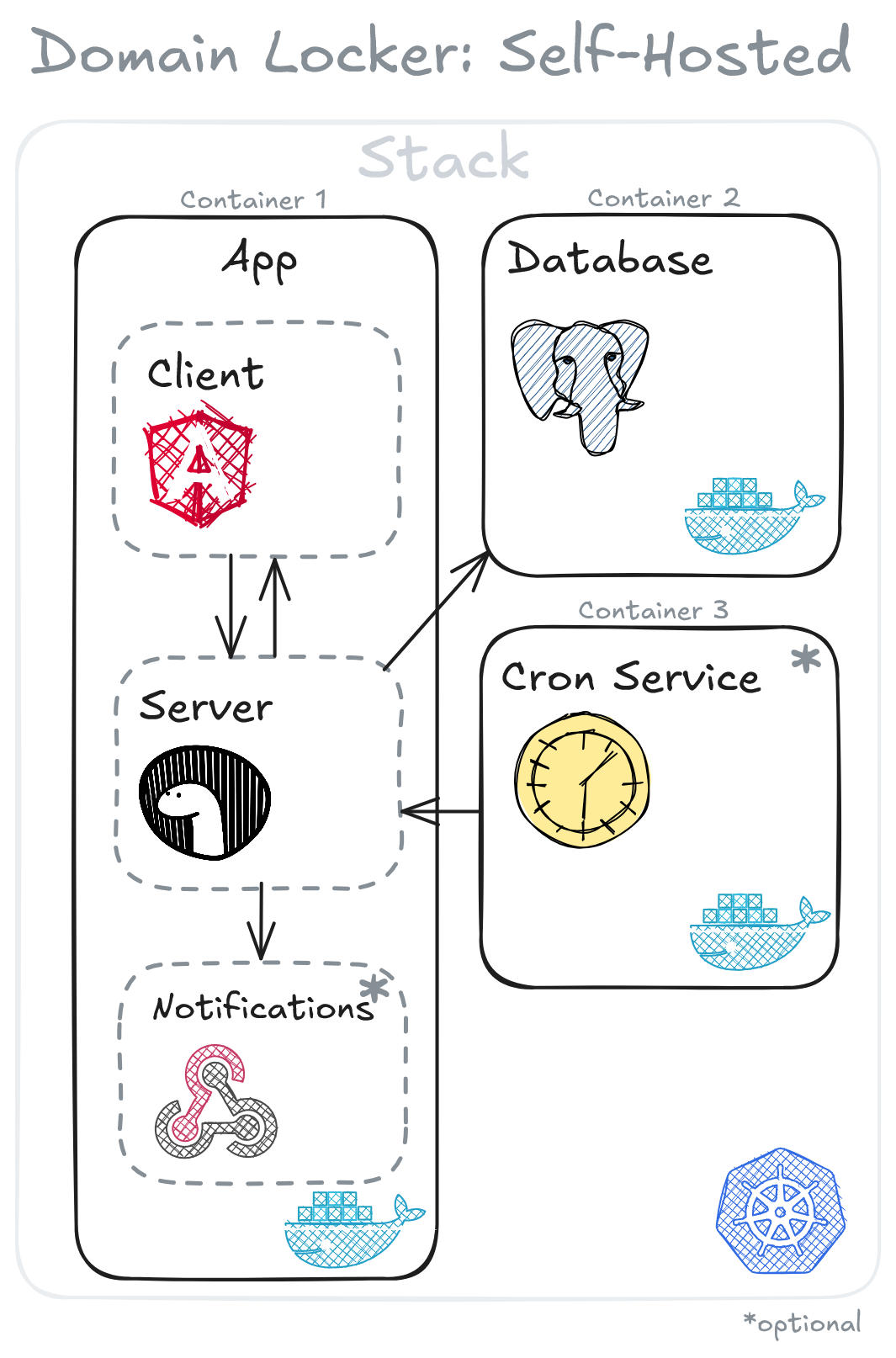
The self-hosted app is very simple, and runs in a single container:
- The app itself (client, server, scheduled jobs and optional webhooks for notifications)
- Your data, in a SQLite file, or in Postgres if you'd rather run one
Managed Version
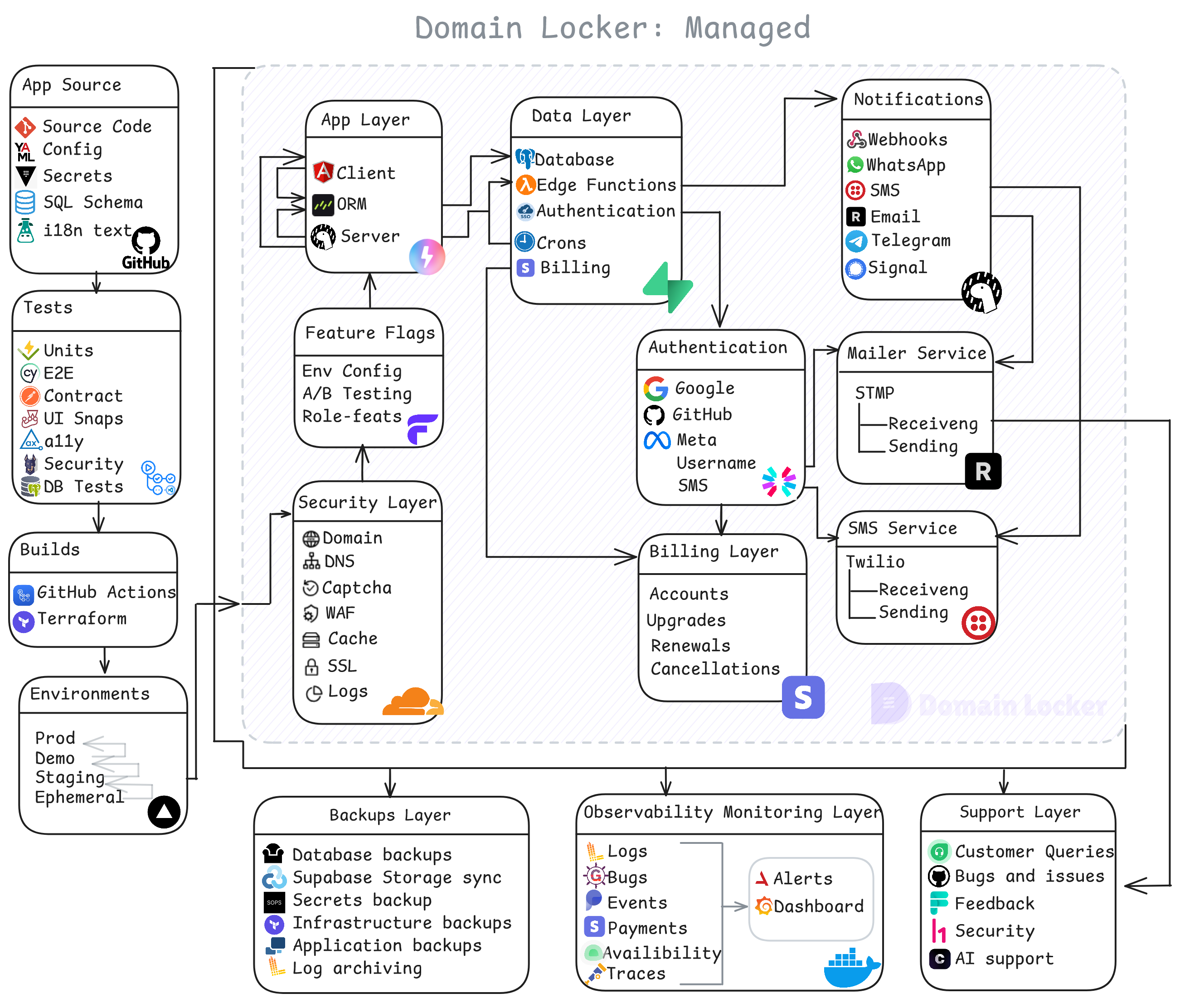
This differs slightly from the managed instance, which has the same core web app, but is reliant upon some non-free services for extra features and security.
Why the difference? Running a SaaS app requires some additional components/layers in order to offer users the best possible experience. For example, the managed app also needs to cover the following areas:
- Multiple environments, automated CI/CD
- An ORM between client and server
- Feature flagging and role-based features
- Domain name, DNS, Captcha, WAF, cache, SSL
- Billing and user plan management
- Authentication, authorization and SSO
- STMP mailer service, and Twilio SMS
- Notification channels for WhatsApp, SMS, Signal, etc
- Backups for database, config, logs, assets
- Observability for bugs, payments, availability, traces
- User support for queries, billing, bugs, feedback, etc